That sounds pretty good. How will the markers on the map be set? Is that a manual job or is there some in-game mechanic for setting the signs?
1 Like
I bet it’s a manual job.
1 Like
Those are the default icons. We can add more of course. They do have more on the WoW map for instance.
There are svgs if you want to create new ones out of the default ones. Look here: http://docs.overviewer.org/en/latest/signs/#marker-icons-overviewer-ships-by-default
Here’s the documentation: http://docs.overviewer.org/en/latest/signs/
It can be both. Manual and dynamic. The wow map was most probably done manually like so: http://docs.overviewer.org/en/latest/signs/#manual-pois
That’s ok for a project like the WoW map … but our map will expand.
I will create python functions that scans every sign for certain key elements, I’m thinking something like: “#T#R#” in the first line of the sign to indicate it is a sign that will create a marker with a red town icon. Then the function will return line 2, 3 and 4 to the marker.
I can’t python yet, but shouldn’t be to hard.
Here’s an example in pseudo python.
def filterTown(poi):
    if poi['id'] == 'Sign':
        if poi['Text1'] == "#T#" or "#T#B#"
            poi['icon'] = "icons/marker_town.png"
            return "\n".join(poi['Text2'], poi['Text3'], poi['Text4']])
        if poi['Text1'] == "#T#R#":
            poi['icon'] = "icons/marker_town_red.png"
            return "\n".join(poi['Text2'], poi['Text3'], poi['Text4']])
3 Likes
That sounds good. We can hide the special signs somewhere beneath the towns so that they can’t be seen. Looking forward to how it works!
Also, check this out: some robbers have struck gold in Cheston!  I wonder if they’ll be caught?

2 Likes
So … code is online. Don’t have time to document it and tell you how to use it though. Also I don’t know if it works. Please report bugs. Also it has to be run manually like the map generator.
Here’s the code. You can try to decipher it. I’ll post a “How-To” later:
Here’s a pastebin of the code: http://pastebin.com/Yg8GuQey
I’ve tested a sign. The only thing I’m not sure yet is about the formating of the info popup. We’ll see.
Why didn’t I make a function for the icon selection? Well I tried but not all defined functions in the config are imported, even if the selector was defined berofe it was used. So just copy paste. If someone knows how to “case” something in python “if if if else else” please tell me.
1 Like
Alright. I think you guys can start labeling things. I’ll tell you how the markers will react right now.
#Markers: How-To and behavior:
Please place a poppy on top or near where you hid the marker sign.
A minecraft sign has 4 Lines.
To create a marker on the map you have to write following on a sign:
-
On the first line:
-
Start the definition of a marker with #.
-
Now define the category, this will tell the marker under what group it should go.
-
There are 4 categories:
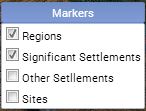
- Regions, default visible, define it with R.
- Significant Settlements, default visible, define it with H.
- Other Settlements, default off, define it with L.
- Sites, default off, define it with S.
-
-
Close that with another #.
-
Now define the kind of icon that should be used. Every icon from THIS LIST(except plain) can be used with every category.
- There are 19 icons:
- Icon - KEY - Default Color - Additional Colors
-
 ANO grey
 -
 ANV blue - red
 -
 CIT blue - red
 -
 FAC blue - red
 -
 GEN grey - blue, red
 -
 HOE blue - red
 -
 KIN blue - red
 -
 MIN blue - red
 -
 CAR blue - red
 -
 MOU green
 -
 PLA green
 -
 RUI grey
 -
 SHI blue - red
 -
 STA grey - blue, green, red
 -
 TOW blue - red
 -
 TWN blue - red
 -
 TRE green
 -
 VIL blue - red
 -
 WAT green
- There are 19 icons:
-
Close that with another #.
-
(Optional) Define the color, if omitted default icon color is used:
- If you want the blue icon, use BL.
- If you want the green icon, use GR.
- If you want the grey icon, use GY.
- If you want the red icon, use RD.
- If used close that with another #.
-
-
If line 1 is correct, the rest of the lines of the sign are forwarded to the marker in the following way:
- Line 2, Line 3 and Line 4 are connected into one single string without spaces or new lines.
- These can be seen when clicking on the marker, this opens the marker info.
- They are also visible as hovertext.
- Take care when placing spaces.
- Don’t forget about following possibilities:
- Adding a space as last character on a line. (To separate words.)
- Continuing a word on the next line.(For long words.) <img ALIGN=“Right”; src=“//inovaestudios.blob.core.windows.net/forumsavatars/54415a0612c4a115ab0f0271c89ed7e395546fc496e.JPG” width=“194” height=“177”>
-
(Optional) Images: Screenshots can be added by sacrificing line 4:
- If you start Line 4 with a # it won’t be injected into the title
- Upload a screenshot without HUD to http://imgur.com/
- Right after the # type in the imgur image code
- Example Line4: “#abUoQ7u”
 ANO grey
 ANV blue - red
 CIT blue - red
 FAC blue - red
 GEN grey - blue, red
 HOE blue - red
 KIN blue - red
 MIN blue - red
 CAR blue - red
 MOU green
 PLA green
 RUI grey
 SHI blue - red
 STA grey - blue, green, red
 TOW blue - red
 TWN blue - red
 TRE green
 VIL blue - red
 WAT green
###Examples(black bars indicate spaces):
Sign:             Output:
#R#HOE#           Kingdom Wheatland
Kingdom█          Region                   ∞
Wheatland

Sign:             Output:
#L#VIL#RD#        Superimportantvillageofred
Superimportantv   Village                  ∞
illageofred

Sign:             Output:
#S#GEN#RD#        Evil Superweapon
Evil Superweapo   Site                     ∞
n                      {CLICKABLE}
#Au54bUR               {THUMBNAIL}

Sign:             Output:
#L#v#R#           This is animportantvillage.
This█is█an        Village      Incorrect Key!
important.
village.
3 Likes
Great! I have to test this is action. A little later today or then tomorrow. 
In my coming background story for Ardinia I was thinking that the plains near Ardinia would be called Ardinia Valley. And the kingdom (full name: Kingdom of Ardinia Valley) would actually derive it’s name from the Valley and not the other way around. And of course not all of the Ardinia Valley is part of the Kingdom. Hope others are ok with this?
Oh… and don’t expect me to help with the coding. I have 0 skills in that area 
2 Likes
Just tell me when you labeled some and I’ll run the generator.
No problem. It’s allready done buddy. You can look at it though and learn something from it. Python is pretty much the most straightforward language I’ve seen yet, when it comes to syntax at least.
1 Like
Ok I will go and place a sign under the fountain. I’'ll inform when ready.
1 Like
I reversed engineered the methods used on the WoW map.
I just deleted the part where the icon is put into the popup window in javascript.
I added a new css file.
I made the signs and markers use the css file.
Result:

3 Likes
Looks great
Here’s a collection of the new icons I made:

Green means stuff in nature. Blue is the “good guys”, red is the “bad guys”. Grey is man made but no one owns it (for ex. ruins).
Some still need polishing and they all need a shadow (I accidentally removed it from the base file).
2 Likes
I don’t know if it is in the base file … I made a small own icon and am not sure if it is really there.
Also lucas. Could you reduce the size of all the icons when you fix them? It would fit the map more. I updated the folder: http://lomsor.com/minecraft/overviewer/C04/icons/
I’ll update my post from above right now. I added links in the markers that link to some locations look out for them.
1 Like
don’t think the size can be reduced. I was already struggling to get the detail there in that size. I would have to re design some of them 
Besides I already added the shadow. Copy pasted them from one of those default icons. It was done in a few minutes.
New icons in your mail in a few minutes ->
1 Like
These are about half the size and still look great: http://overviewer.org/wow/#/5546/64/11111/-5/0/0
1 Like
Are you talking about file size here or actual size of the image?
1 Like
The ammount of pixels they have on their x and y axis.
2 Likes
But aren’t those default icons we already used full size also? Even the spawn icon is that same size.
Edit: full sized icons with shadows are in your mail.
1 Like
Now all new icons types are working. Lomsor made some fine tuning to the system.
@xamino, I had to replace those signs you placed in the west because the naming system changed. I also placed that red rose on top of the sites for additional marking 
1 Like
Okay, sure. So @Lomsor, could you post an updated guide to the signs? Then we could start doing everything…
2 Likes
He has updated the first post that contained the guidelines. Although the examples were not updated yet (V for Village Category still there).
@Xamino, time for some labeling trips? I’m online now.
1 Like